These databases are used to store external contacts that the company interacts with in its daily operations.
Through them, you can:
Keep an organized list of suppliers, clients, or external contacts.
Send direct messages to these users from the details of an issue or record.
Decide which fields of the issues are included when sending.
This way, teams can manage external communication directly from Solved, without needing to leave the platform or duplicate information.
Go to settings
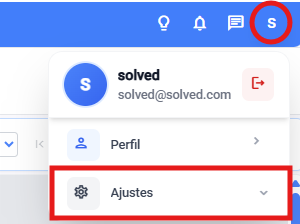
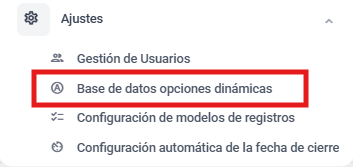
Enter the dynamic options database module
a. From general settings

b. Or from the dropdown in the main view
Create a new database and select the User type.

Give a representative name to the database (for example, “Material suppliers” or “External customers”).

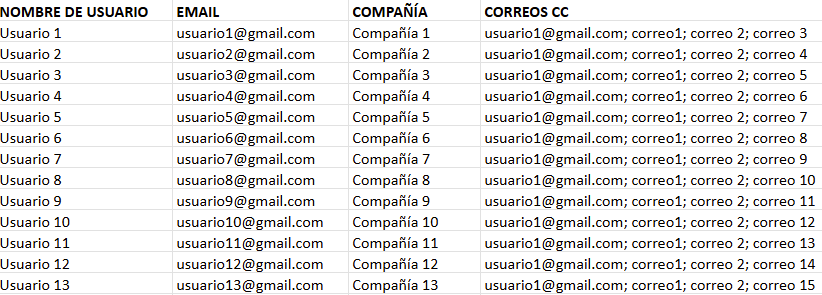
Prepare the Excel file. It needs to be super tidy and organized in columns, with no extra info, or it could mess up data importing.
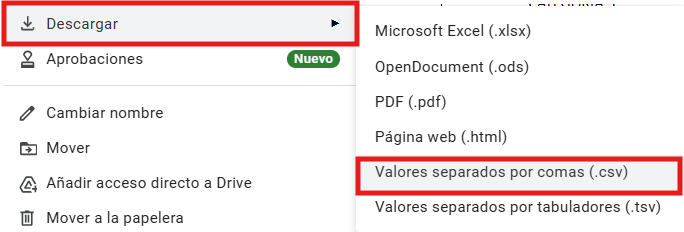
Convert the file to CSV when it’s ready
Go back to the platform and import the file into the new database

Once you have selected it, import the data

Save the configuration.
Once created, this database will be able to sync with the incident templates, allowing:
Select the external contact directly from the incident.
View their associated information.
Send messages or automatic notifications according to the configured fields.
💡 Tip: Before you sync the database, there's a quick explanation of how the document needs to be organized so the platform can read it properly.